Indie Publishing: Published (Finally!)

First things first: my debut novel is published. Like, for real. The official “birthday” for the eBook was January 1st, 2022. Its nearly identical twin, the paperback, was born the following day. Instead of announcing this joyous occasion to the world, my first instinct was to keep it a secret while I made sure everything was okay. Call me paranoid, but I had so many formatting problems – particularly with the eBook – that I figured it was better to be on the safe side than the “filled with horrific errors” side. I bought a copy of the physical book, and while that was being printed and shipped, I checked out the eBook on the few devices we own. Aside from an odd white border around the eBook cover (which has since been corrected), everything looks good.

So, it’s out there, and now I feel…weird. Not in a bad way. More in an “Okay, now what?” way. I mean, this book has been with me almost my entire adult life – all the way from that little spark of an idea I had over seventeen years ago, while talking to my brother in the parking lot after watching the movie Spider-Man 2. Just hearing how much those characters meant to him, and realizing how much they mean to so many people. The escape they offer. The hope they give.

That little spark led to sticky notes on my wall, which led to a handwritten, 300Kword first draft (three years to write, another two just to type). Once the word processing was complete, I remember feeling pretty smug about my own awesomeness. Then I started to read the book, and actually shed tears over how bad it was. At least, the early part of the book was bad. Towards the middle, when I learned not to describe in detail every time a character blinked or inhaled/exhaled, it got a little better. By the end, the writing was halfway decent but still a far cry from publishable.

I got painful but extremely valuable notes from my mom (who else but a mother would read a 1,500-page, not-so-well-written manuscript?). I revised, cut 100K words, revised again, got more notes from Mom and a few from my newly formed writing group. Sometimes, I’d let the book sit for months or even years as I worked on other projects, strengthening my craft. But I would always come back, cutting, polishing, searching for that diamond I knew was in there. When I finally got it down to 150K, I felt I’d hit a wall. I needed help to break through that last barrier, and found it in an amazing critique partner named Anna, who read the book with her then ten-and-a-half-year-old son and gave me the fresh perspective I so badly needed. Boring scenes, cut. Target age group, decided. Another 57K, gone.

So, yeah, this book has been over seventeen years in the making. But really, I think the story has been with me for even longer.

It might’ve started when I was in seventh grade, standing outside the main office at my junior high school, clutching a folded letter addressed to my band teacher. I paced for a good ten minutes, sweat soaking through my Mickey Mouse t-shirt, before finally darting inside and placing the note in my teacher’s mail cubby. Then I high-tailed it out of there, wondering if I’d just made the biggest mistake of my young life. Wondering if my teacher would believe me about the terrible things some of my classmates were doing to me behind her back – words I had to write, because I couldn’t say them out loud.

Amazingly, she did.

Or, maybe it started even earlier than that, when I was a small child watching X-Men cartoons with my brother in the mornings, then spending the afternoons jumping off the back deck with a garbage bag parachute, chasing the thrill of that gravity-defying moment of lift before the inevitable crash down to earth. Didn’t matter how many times my knees buckled, or my teeth clacked together, or my feet ached from that jarring impact. It was all worth it for that one little second of something more. That one instant when I felt like I was flying, even though such things are not possible in the “real world.”

I wrote this book for that little girl. I wrote it for any kid who’s ever tied a red blanket around his/her/their neck and pretended to be a superhero out fighting the bad guys. I wrote it for all the kids who are standing outside an office right now, holding a letter filled with words they can’t say out loud. And I wrote it for everyone – young, old, or anywhere in between – who believes that inside each ordinary person lies an extraordinary one, just waiting to break free.

I hope you guys love it.

~G

Indie Publishing: Fun with Formatting

A Formatting Impaired Writer

Formatting is not my strongsuit. At all. To quote one of my college professors: “I’m not going to mark you down on those last few pages, because obviously something happened and you didn’t intend for it to look like that.” So yeah, formatting and me? Hardly on the best of terms.

When I decided to go the indie route, I had to choose which aspects of the publication process I could handle on my own, and which I would have to shell out $$$ for. And, even though formatting has been the ugly, drooling, Dorito-breath monster in my closet for years, I decided to face the beast head on and at least TRY to format my own book before breaking down and hiring a professional.

Why, you ask? Two reasons:

1.) I am so painfully broke it’s not even funny.

2.) I felt that formatting was something I could actually learn to do well if I put in the time and effort. And, if successful, I would then be able to do it for all of my future books, thereby saving my (hopefully slightly less broke) future self some cash down the line.

As a format-challenged person, learning this skill was sort of like having a root canal minus the novacaine – something I have actually experienced, and yes it hurt like you-know-what. But after countless hair-pulling moments and a few pillow screams, I finally had a book that looked exactly the way I wanted it to. No weird spacing issues. No random alignment gaffes. Blank pages only where I intended them to be (and nowhere else!).

For some people, this might sound easy-peasy. For me, however, this was a Mt. Everest-level accomplishment. And since I know I can’t be alone when it comes to my formatting struggles, I decided to share some of the tips and resources that helped me, along with a few of the issues I considered while formatting my book for print.

Decisions, Decisions

If you decide to format your own manuscript, you’ll be in charge of choosing everything from the actual trim size of the book all the way down to the font size and type, line spacing, and how the first page of each chapter will look.

Some details that might affect these decisions:

-Book Length

-Genre

-Intended Audience

In my case, I have a novel for younger audiences (11-13 years), so an easy-to-read font was paramount. My book is also somewhat long, so I had to take the potential spine width into account as I looked at different trim sizes. The bigger your book’s trim size is, the larger the pages are and the more words you can fit on them. Which means a skinnier spine and a lower printing cost. However, books with extremely large trim sizes can be awkward and uncomfortable for readers to hold. So everything is about finding that right look and right balance for your specific novel. To gain one element, you might have to sacrifice another.

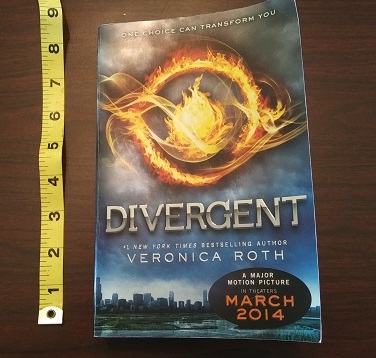
In my opinion, an ideal paperback has a trim size of 5″ x 8″. Because of my book’s length, I had to compromise on this a bit and go with 5.25″ x 8″. If you have a super short book, you might want to go the opposite way and choose the smallest trim size to make your book thicker.

Many professional novels have each chapter start on an odd numbered page, even if it would not naturally fall there. Because my book is long with fairly short chapters, this would have meant including a significant number of unnecessary blank pages. Since I do actually care about trees, I decided not to restrict myself in this way. I also elected to do without the standard header (alternating between author’s name and book title) on each page. Again, this was to save pages and keep the text easy to read.

My novel has the same trim size as the paperback edition of Divergent

One thing that’s really beneficial (and also kinda fun) is to take a bunch of books off your shelf and actually measure them. You’ll be amazed at the range of sizes. Flip through each one and sample how their chapter openers look, where the page numbers are, how they display the header and footer, what fonts are used. There are so many different styles! Make a note of which books in your genre have the best “look” and try to emulate that.

If you’re writing a science fiction novel, you might want to use a futuristic font for the chapter headings to give it that sci-fi feel. For a memoir, chapter titles might look cool in a font that looks like handwriting (as long as it’s legible!). If you’re writing a heart-pounding action adventure set on a global stage, you may want each chapter opening to have additional information like what country the characters are in, what time it is, and how many minutes are left until the bomb goes off!

Below are some links and tips to help make your book both beautiful and professional.

Resources

  • This is THE best video ever for formatting your print book in MS Word. This totally saved my life. The author explains everything and makes it all so easy a kindergartner (or me!) could do it. The vid covers common mistakes (and how to avoid them), mirror margins, gutter space, formatting chapter headings using styles, line spacing and more. The only things it doesn’t really touch on are drop caps (those pretty, extra big letters at the start of each chapter) and page/section breaks. But this will give you all the basics and you’ll be in great shape as you move on to some of the more intricate details.
  • Here is a link to KDP’s guide to trim sizes. It also discusses bleed (when you want an image to go off the edge of the page) as well as their recommended margins for different sizes of books. (Tip: go bigger than recommended for the gutter margin).
  • KDP’s instructions for formatting your print book. IMHO, the video posted above is much easier to follow, but there are a few elements here not included on that vid, e.g. the section break stuff, which is really important if you want certain pages NOT to have numbers on them. Page breaks are also important to learn about, especially when it comes time to format your ebook, so definitely don’t skip out on these lessons. The most valuable thing I got out of this page was the last part, which clearly explains how to export your final Word Doc(x) as a pdf, the form it must be in to upload it to your bookshelf.
  • How to delete unwanted blank pages in Word! The method that really saved me was using the navigation pane. Worked every time. 🙂
  • How to create drop caps in MS Word. (FYI, drop caps RULE! They make your book look awesome and professional. Tip: To change the appearance of your drop cap, e.g. how tall it is, click “Drop Cap Options.”)

Have Fun Building Your Book!

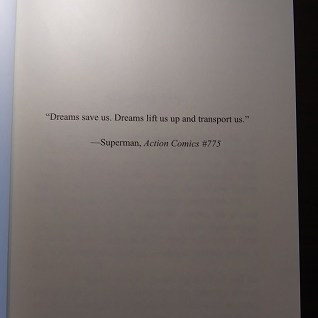
Reading about all of these new terms can be overwhelming for a first-timer. It definitely was for me! Just remember that it does get easier. Any problem you have or anything you can’t figure out how to do, just call on your old pals Google, Bing, and YouTube and they will help you find someone who can answer your question. If you want to do something special, like add a map to the beginning of your book, or an image next to each chapter title, or a blank page with just a quote right in the middle, don’t give up simply because it seems too hard. Keep trying until everything looks exactly the way you envisioned. You deserve it, and so does your book. 🙂