Hey all! Long time, no blog! My apologies for the extended absence. Some big life changes, including a sick cat and a brand new job, have kept me very busy and struggling to find my new “normal.”
I’m happy to report that the cat is doing better, and I’m starting to find small windows where I can squeeze in some writing time. Lately I’ve been writing on my phone when outside with one of my special needs cats, as well on my lunch breaks at work (that’s where I am right now!).
My new writing partner!
It reminds me a lot of the old days when I first started writing. I just couldn’t find a good time to sit down at the computer and write. And I realized if I waited until I could find time to do that, I’d be waiting forever. If I really wanted to write my book, I’d have to find another way – so I did. I handwrote my first book in 15 numbered notebooks while outside watching our dogs and doing other animal-related chores.
If you want something badly enough, you will find a way, and I guess I needed life to teach me that lesson again.
One thing I wanted really badly was to release my paranormal romance novelette, Scars, before starting my new job. I am thrilled to report that I got this done, and Scars is available on Amazon and can be read for free on Kindle Unlimited:
For all those who have self published a novel or are considering doing so, there’s one very important thing you should know: your book has a superpower. Sounds awesome, right? Until you realize what that superpower actually is: invisibility.
That’s right. Your book is invisible. No one can see it except you. So…not as awesome as what you were imagining (admit it – you thought your book could fly or shoot lasers from its title page). And let’s face it – invisibility is definitely not what any author wants for their precious newborn novel.
But that’s not the end of the story: YOU, the author, have a special power too. You are the only one on earth who can make your book visible to others. And that is an amazing power, if you can just figure out how to use it.
Below is a chronicle of my efforts thus far to make my debut novel appear in the eyes of the world.
After some initial sales to kindhearted friends and family members – and three wonderfully detailed reviews from book bloggers – my YA novel quickly returned to its original state of invisibility, where I sadly left it for several months. I didn’t really know what to do or how to move forward, so I just let it stagnate.
Eventually, I pulled myself together and made some kind of effort by enrolling the book in Kindle Select (This is what it’s called on the author side of things. On the reader side, it’s known as Kindle Unlimited.)
Enrollment has several perks. Readers with a KU subscription can read the book for free, and authors are paid a certain amount per page read (typically about half a cent). The program also allows authors to give their ebooks away for a certain number of days per enrollment period, or reduce the price for special, short-term sales called Kindle Countdown Deals.
The one main downside is that you can’t have your ebook available anywhere else – it must be an Amazon exclusive (not a dealbreaker for me, since my ebook wasn’t published elsewhere).
With much excitement, I arranged my first giveaway. I posted on this blog that my book would be free, and promoted it on Twitter (is anyone actually calling it X?) as well. All told, eight people downloaded the book during its free days. In my mind, that was pretty good – eight more people had discovered my book and might actually read it.
A few months later I tried another giveaway, this time promoting only on Twitter. Zero people downloaded the book. It was a definite low moment for me. Apparently, I couldn’t even give my book away. Then there was the fact that my one and only KU reader made it through 158 pages, then abandoned the book, never to pick it up again, and I would never know why.
After these glaring failures, I slumped into despair for a while, and my book sales were at zero for a good 5-6 months. Eventually, I picked myself up, dusted the self-pity particles off the butt of my jeans, and got back to work fighting for my book.
The first thing I did was spend weeks researching proper categories and keywords for my novel – something that should have been done prior to publication. I’ll try to do a separate post on this because it’s vitally important.
Bargain Booksy
Once my book was as well-categorized and keyworded as possible, I decided to try pairing a Kindle Countdown Deal with a paid promotion on Bargain Booksy. Bargain Booksy sends out emails to subscribers about discounted books ($4.99 or less) in each reader’s chosen categories. The discounted books are also listed on BB’s website.
In my case, I paid $25 for my book to be emailed out to the 150,000+ subscribers in their “Young Adult” category. My book was already priced low enough that I didn’t have to reduce it further, but I dropped it to $0.99 just to sweeten the deal.
My Bargain Booksy promo email went out on a Monday (the first day of my countdown deal). One person bought the book that day. I made another two sales the following day, and one later that week. Four sales, in all, and though I didn’t make back anywhere near what I spent, it still felt better having people buy my book than giving it away for free and having no one even take it.
Despite not selling oodles of copies, I will say that Bargain Booksy was very easy to work with, and gave clear instructions on how to set the timing of the Countdown Deal so that it would match up perfectly with the promotional email.
Also, I signed up for their newsletter (they strongly encourage all authors to do so) and while I enjoy getting the daily emails featuring bargain YA books, I do wonder how many of their subscribers are actually fellow authors who signed up in the process of advertising their books.
Amazon Ads
Having gotten a taste of people actually buying my book, I didn’t want to turn back. My next foray into paid advertising was through Amazon Ads. I found an awesome tutorial which simplified the process of setting up different kinds of ads, and got to work.
My first campaign was a sponsored product ad with automatic keyword targeting and a small amount of custom text. In this model, Amazon would choose my keywords for me, I would get impressions (views) if my bid was competitive enough against other advertisers, and I would only pay if someone clicked on my ad.
I set my bid at $0.40 per click, sat back, and waited. Not much happened. My impressions were at zero, and I got impatient, so I upped my bid by five cents every day until I started getting impressions.
I think my bid was at $0.65 or $0.70 by this point, and I was getting about ten impressions per day – very low, but at the time I had no idea ten was a bad number (FYI: if you get one click per 1,000 impressions, and one sale for every ten clicks, that’s pretty good). I left it alone for a month, got no clicks (and therefore paid nothing), but felt good that at least a few people were seeing my book. It was no longer invisible.
The next month, I tried a manual targeting campaign (i.e. I chose my own keywords). This was fun because I had researched the heck out of keywords several months prior, and since you can only choose seven for your book’s metadata, a lot of really good ones didn’t make the cut. This gave me a chance to use them all and then some.
I unwisely set my default bid at $0.60, allowing it to go up to $0.90 for prime advertising real estate (e.g. the top of the search results page). Right away my impressions were in the upper hundreds/low thousands, and I started getting clicks. Sometime during that month, one of those clicks resulted in a sale. I was ecstatic – someone had discovered my book, read the description, and decided the novel was worth spending money on.
The next few months ran in a similar vein, though the spend gradually increased from $15 a month, to $20, to $25. I typically sold between 1-3 books per month through ad clicks, and was definitely in the red, but still feeling good about investing in my novel.
Things went both right and badly wrong in January. About a third of the way through the month, my sales jumped to $111.92. I thought it was a mistake. It turned out not to be.
Apparently, I had sold eight paperbacks from a single $0.75 click. This was really cool, but also confusing. Why would someone buy eight? I felt like I was missing something, something bad, but couldn’t figure out what it was. Part of me wondered if Amazon periodically buys books from its own advertisers, then resells them, all the while keeping authors addicted to ads via the sweet taste of making the occasional sale. I doubt this is the case, but wouldn’t it be a massive scandal?
No matter what the reason for the weird eight-book click, my impressions soared, as did my clicks, yet I failed to make another sale that month, landing me deeper in the red than ever before. In the end, I spent over fifty dollars on ads in January, and only made ten of it back in royalties.
Being on a very tight budget, I couldn’t afford to continue at this rate, and after a panicky and disastrous effort to quickly lower my bids, I ended up having to pause both my campaigns (the manual, and the automatic, which I had left running because it occasionally came alive and generated a few clicks, though never any sales).
I am not done with Amazon Ads, but I do need to regroup and figure out how to do it on a budget that works for me (i.e. much lower default bids). I also need to view it as a long-term investment and let things grow and build momentum slowly, rather than jacking up the bids in the first few days just to see some results.
Voracious Readers Only
Even though I sold some books through paid advertising, I felt that I could have sold more if readers had more than 3 or 4 reviews to peruse for info and opinions about my novel. In an effort to gain reviews and new readership, I did a free twenty-book giveaway on a site called Voracious Readers Only. This site focuses on connecting readers with fledgling authors, in hopes of the experience being beneficial for both parties.
Authors gain new readers (who are encouraged by the site to leave reviews), and also get to add those readers’ email addresses to their mailing lists. Readers get a steady stream of free books and the chance to help authors out by joining their mailing lists and leaving reviews.
To get the most out of my giveaway, I decided to first set up a mailing list. I signed up for a free account on MailerLite.com. They quickly informed me that sending out my newsletter from a free email address (e.g. yahoo, gmail, etc) was very bad and likely to go to spam instead of my readers’ inboxes. They recommended that I purchase my own domain and a professional email address to go with it.
Thus, what started off as a free venture ended up costing me $$$$$. When all was said and done, I owned my own website, and had a pro email address. Later, I got to thinking and decided to check the sender addresses of the author newsletters I am subscribed to. They were ALL free emails. **facepalm**
On the bright side, since I upgraded my WordPress site, you won’t have to look at those gross adds for reducing belly fat anymore. So, you’re welcome. 🙂
My experience with VRO was…interesting. Unlike Bargain Booksy, I didn’t find VRO’s interface to be user friendly. I was confused several times while setting up my giveaway, had no idea what information was going out to readers, and began to wonder whether it was even okay to put anyone’s email on my list, should I be lucky enough to get any requests.
Also, when entering info about my book, there was apparently a word count limit in the “reviews” section…however, the site didn’t let me know that. I included the three reviews I’d gotten from book bloggers (VRO asked for 3-5 reviews), but one of my reviews got cut off in the middle and there was no way to see this until after the form was already sent. I thought my form looked like a pile of crap, and worried that this was what readers were going to see.
The day of my giveaway arrived, and requests began to trickle in before the one-hour window opened, and continued all the way until the next morning, until I accumulated the promised total of 20 opt-ins. Thankfully, the communication from VRO on that day was clearer, and I at least understood that everyone who opted in had voluntarily signed up for my mailing list.
Time to get to work! I dutifully sent out copies of my ebook to everyone who asked for one, thanked them profusely, and signed them up for my newsletter. The automated Welcome message I’d set up on MailerLite seemed to go out exactly as planned. Roughly half of the readers opened the newsletter, while the rest ignored it or it got lost in their spam traps. One person immediately unsubscribed, which didn’t feel great, but I tried not to take it personally.
Still, I had a few subscribers, and that felt good. Roughly a month later, a new review popped up on Amazon from one of the VRO readers. Just a single word – “Stunning” – accompanied by a five star rating. It was definitely one of the better days I’ve had in a while. 🙂
Takeaways
Investing in my novel feels so much better than giving up on it.
Paid advertising DOES sell books, but so far not enough to cover the cost of the ads.
Giving my book away in exchange for subscriber email addresses seems more beneficial than just giving it away for nothing.
In case you missed that big purple button up there, I have a newsletter now! Here’s where you can sign up: https://subscribepage.io/gabassier_newsletter (if you’re on the fence about clicking, there’s a REALLY cute pic of my cat Black Canary on there).
I can’t wait to save up a bit of $$ and try more adventures in advertising!
Are you an indie author trying to market your books? What have you tried so far? What works for you and what doesn’t?
It’s been a little over a year since I self published my first novel, and it has been a LOT of fun, as well as a huge learning experience.
The happiest moments so far:
Seeing my book’s product page for the very first time
Having friends and family send me pictures of my novel after they bought it, or screenshots of themselves ordering it
Getting a multi-page letter from one of my uncles, out of the blue, with a detailed review of the book and the words “This is the best book I’ve read so far this year.” Okay, it was only March at that point, but still. ;P
Hearing from another uncle that he’d given a copy of the novel to his grocery shopper, and she “loved the book, could not put it down, and even cried at times.”
It’s really hard to get readers when you don’t have many reviews.
It’s really hard to get reviews when you don’t have many readers.
Right now, I am still struggling to break out of this chicken-and-egg cycle. I totally get why people wouldn’t want to buy a book – or any product – that doesn’t have reviews, because the quality might be poor. I also totally get that most people don’t have lots of money to spend at the present time. Heck, the majority of books I read these days are either library books or those obtained through giveaways. Free books rule – and I think they’re a really great way to find a new audience.
On that note, I am SUPER excited to be holding my very first free promotion for Even Heroes, which will run today (Monday, January 16th) through Friday (the 20th). My ebook will cost a very affordable $0.00 for all readers during that period. You should be able to simply visit the product page on Amazon, and then download the book to the reading device of your choice. I really, really hope some folks who don’t have any extra money (or are just wary about trying out an unknown author) decide to give my novel a chance. If you miss the promotion, don’t worry, there will be more in the future (plus, the book is already free to borrow for anyone with a Kindle Unlimited subscription).
And hey, if you do decide to give it a go, please consider leaving a review. Or even just recommending the book to a friend or family member, who might then enjoy it and pass it on to someone else. Word of mouth is a powerful tool, and I have personally discovered plenty of great books through recommendations.
At the end of the day, though my sales are basically nonexistent and KU subscribers haven’t borrowed a single copy yet, my chin is up. I have no regrets about self publishing, and can’t wait to share more of my titles this way. I knew this would be a hard road. I knew I would get out what I put into it, and I haven’t done nearly enough yet to promote the book. Hopefully in time, with many more books and giveaways under my belt, I will actually find my readers. In the meantime, my wonderfully supportive friends and family (plus some very encouraging reviews) help me keep the faith that I do have something special to share with the world. 🙂
For a REALLY long time, I didn’t have a Twitter account. I had no idea what I’d even do with one. Then my favorite TV show got cancelled, and Twitter seemed to be the main avenue for fans to protest this development and try to bring the show back. Being the devoted fangirl that I am, of course I had to fight against the unjust cancellation of something great (#SaveForever!), so I signed up for Twitter. And even though our campaign eventually failed (cue the heartbroken sobbing), I did have tons of fun connecting with other diehard fans of the show. Just knowing how many people loved Forever helped ease the pain of its loss.
In the years since then, I’ve continued to use Twitter to fight the good fangirl fight. Sometimes we won (#SaveLucifer, yeah baby!!!), other times we lost (I’m so sorry, Limitless – I tried!), but it was always amazing to have a voice and join forces with other fans in support of a common goal.
Having a Twitter account came in handy for other purposes, too. For example, I linked my Twitter to this blog, so whenever a new post goes up on here, my Twitter followers (all twelve of them!!) can see it. Being on Twitter also allowed me to participate in several Chicken Soup for the Soul book release parties, where I made some awesome connections with fellow CSS authors.
But the best was yet to come. In the process of trying to get some much-needed reviews for my novel, I contacted Crowvus Book Blog (https://crowvusbookblog.blogspot.com). To my delight, one of the authors, Judith Crow, agreed to read and review my book (you can read Judith’s review of Even Heroes here: https://crowvusbookblog.blogspot.com/2022/02/book-review-even-heroes-by-g-bassier.html). A few weeks later, Judith contacted me about a new program initiated by Crowvus: a Twitter account that would be curated by a different author each week. It would be a chance to get more exposure for my book, and network with other authors and readers. How could a girl say no to that? 🙂
Thus, for one crazy week back in the spring, I was the curator of the @WeeklyScribe Twitter account. To say it was an amazing experience would be an understatement. At first, I was putting a lot of pressure on myself to really do a great job and provide top-notch content. I was, after all, the first American to curate the account, the first person not associated with Crowvus to curate the account, and I think basically the second person to do it ever. So I wanted to really represent their brand in a respectable way and not do anything to horribly embarrass or offend anyone.
Initially I had a very strict schedule of Tweets laid out. I was going to do two or three posts on a specific topic each day. They were all pre-written. Once I dove in, however, I started to remember what Twitter immersion really feels like. My rigid plans quickly started to loosen up, and I really began to interact organically with other authors. I noticed that polls got a nice response, so I added a few more than I planned. And, while I made sure to post new content every day, I ended up finding more pleasure in reading other people’s Tweets and commenting, liking, following, and sometimes even Re-Tweeting.
I dove happily down the rabbit hole, responding to Tweets about plot, characterization, favorite books, indie publishing vs. traditional, editing habits, etc. I shared quotes and details about my novel, and eagerly read passages posted by other authors – their opening lines, banter between their characters, even silly things, like their main character’s favorite brand of soap.
This may not seem like a big deal to you, but as a writer, I’ve basically been wandering alone in the desert for three years. And suddenly, I was swimming in a lake of writing advice, shared experiences, and jokes about the dreaded synopsis that only other authors would understand. It was heaven! It reminded me just how much of a geek I am about writing. How I could talk about it all day long and well into the night. How it keeps my heart pumping in a world that sometimes feels dead.
I really, really needed that reminder.
In the months since my time as @WeeklyScribe, I have mostly crawled back into my cave, content to be a Twitter hermit. However, I do actually come out into the sunshine once in a while, and when I do, I enthusiastically start checking every hashtag to do with writing (my faves are #WritingCommunity and #writingquestion). And then I start reading those Tweets, and liking, and commenting, and following. I don’t want to lose that lifeline to people who “get” me, now that I’ve finally got it back.
Also, maybe even more significantly, this experience inspired me to start writing again. I am happy to report that I have completed the first chapter of a brand new novel, and Chapter Two is in progress. Slow progress, but progress nonetheless.
So, that was my week as @WeeklyScribe. If you are an author interested in curating the @WeeklyScribe account, I have three words for you: GO FOR IT!! You’ll be so glad you did. I know I was.
First things first: my debut novel is published. Like, for real. The official “birthday” for the eBook was January 1st, 2022. Its nearly identical twin, the paperback, was born the following day. Instead of announcing this joyous occasion to the world, my first instinct was to keep it a secret while I made sure everything was okay. Call me paranoid, but I had so many formatting problems – particularly with the eBook – that I figured it was better to be on the safe side than the “filled with horrific errors” side. I bought a copy of the physical book, and while that was being printed and shipped, I checked out the eBook on the few devices we own. Aside from an odd white border around the eBook cover (which has since been corrected), everything looks good.
So, it’s out there, and now I feel…weird. Not in a bad way. More in an “Okay, now what?” way. I mean, this book has been with me almost my entire adult life – all the way from that little spark of an idea I had over seventeen years ago, while talking to my brother in the parking lot after watching the movie Spider-Man 2. Just hearing how much those characters meant to him, and realizing how much they mean to so many people. The escape they offer. The hope they give.
That little spark led to sticky notes on my wall, which led to a handwritten, 300K–word first draft (three years to write, another two just to type). Once the word processing was complete, I remember feeling pretty smug about my own awesomeness. Then I started to read the book, and actually shed tears over how bad it was. At least, the early part of the book was bad. Towards the middle, when I learned not to describe in detail every time a character blinked or inhaled/exhaled, it got a little better. By the end, the writing was halfway decent but still a far cry from publishable.
I got painful but extremely valuable notes from my mom (who else but a mother would read a 1,500-page, not-so-well-written manuscript?). I revised, cut 100K words, revised again, got more notes from Mom and a few from my newly formed writing group. Sometimes, I’d let the book sit for months or even years as I worked on other projects, strengthening my craft. But I would always come back, cutting, polishing, searching for that diamond I knew was in there. When I finally got it down to 150K, I felt I’d hit a wall. I needed help to break through that last barrier, and found it in an amazing critique partner named Anna, who read the book with her then ten-and-a-half-year-old son and gave me the fresh perspective I so badly needed. Boring scenes, cut. Target age group, decided. Another 57K, gone.
So, yeah, this book has been over seventeen years in the making. But really, I think the story has been with me for even longer.
It might’ve started when I was in seventh grade, standing outside the main office at my junior high school, clutching a folded letter addressed to my band teacher. I paced for a good ten minutes, sweat soaking through my Mickey Mouse t-shirt, before finally darting inside and placing the note in my teacher’s mail cubby. Then I high-tailed it out of there, wondering if I’d just made the biggest mistake of my young life. Wondering if my teacher would believe me about the terrible things some of my classmates were doing to me behind her back – words I had to write, because I couldn’t say them out loud.
Amazingly, she did.
Or, maybe it started even earlier than that, when I was a small child watching X-Men cartoons with my brother in the mornings, then spending the afternoons jumping off the back deck with a garbage bag parachute, chasing the thrill of that gravity-defying moment of lift before the inevitable crash down to earth. Didn’t matter how many times my knees buckled, or my teeth clacked together, or my feet ached from that jarring impact. It was all worth it for that one little second of something more. That one instant when I felt like I was flying, even though such things are not possible in the “real world.”
I wrote this book for that little girl. I wrote it for any kid who’s ever tied a red blanket around his/her/their neck and pretended to be a superhero out fighting the bad guys. I wrote it for all the kids who are standing outside an office right now, holding a letter filled with words they can’t say out loud. And I wrote it for everyone – young, old, or anywhere in between – who believes that inside each ordinary person lies an extraordinary one, just waiting to break free.
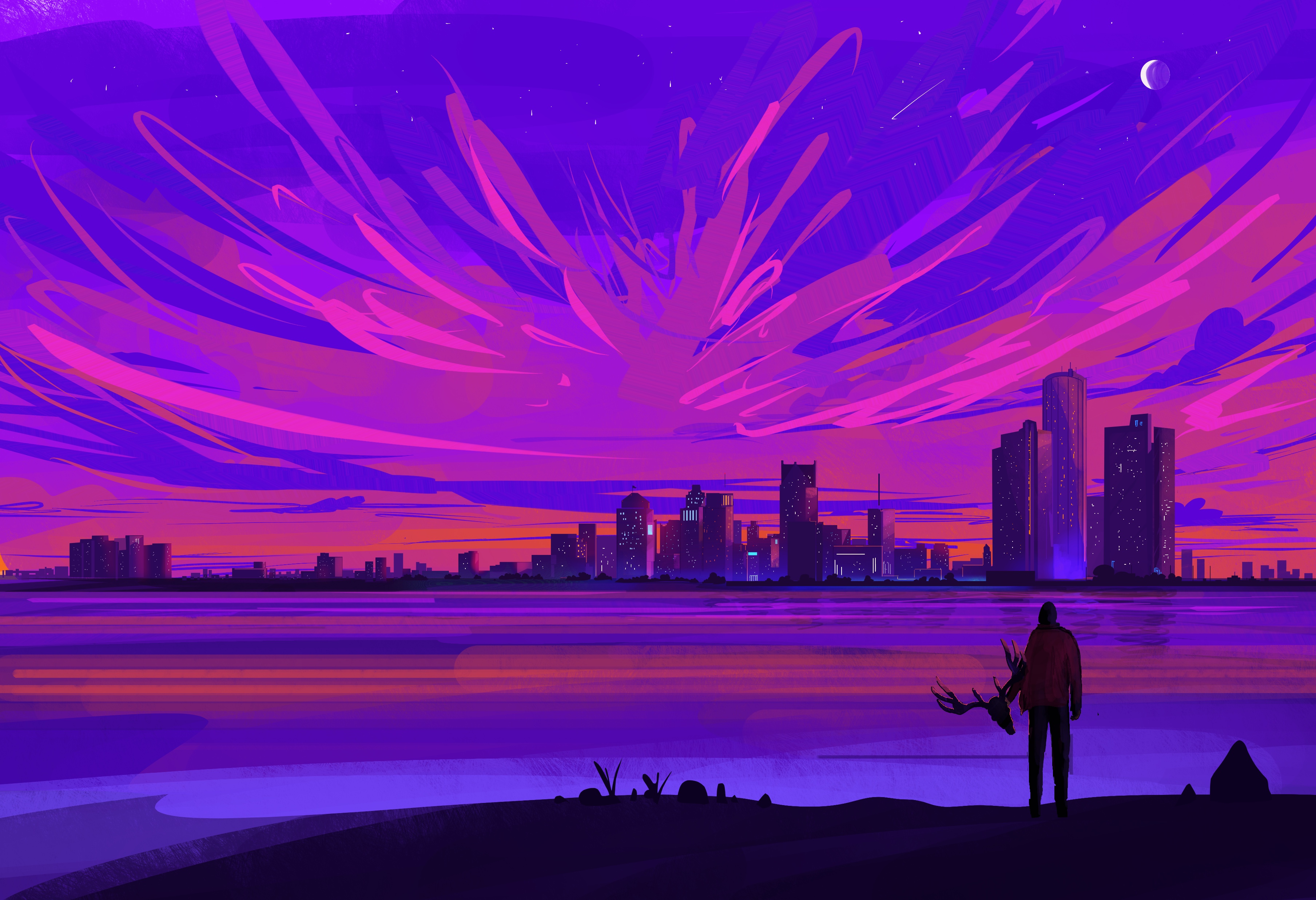
The artist who created the gorgeous image you see above is the insanely talented Muhammad Nafay. Please check out more of his breathtaking artwork on his Instagram or his page on ArtStation. Your eyes will thank you for it, trust me. 🙂 Then, once you’re finished soaking in all the pretty, read about my journey to finding the perfect cover art (and artist!) for my debut novel.
The Hunt Begins
My search began on websites that feature premade cover art. There are numerous advantages to purchasing art that is already created, the top two being: 1.) you know EXACTLY what you’re getting, and 2.) it tends to be more affordable, oftentimes around $60-75 for an eBook cover, a bit more for a wraparound paperback cover (if you’re doing a print book, definitely get the wraparound – believe me, it’s worth it). Below are some of the sites I searched, and they all had a wide selection of excellent work:
I had SOOOO much fun looking at all the amazing covers. I found potential book covers for several of my future books as well as possible cover art for novels people in my writing group were working on. I even made an account on SelfPubBookCovers.com so I could bookmark some of my favorite pieces and artists. The first two sites listed above are especially awesome because you can search by genre as well as by specific images you might be interested in. Like, a raven or an alien or a zombie or a tattered American flag. I kind of went a little crazy window shopping. 🙂 Alas, in the end, although I found some “maybes,” I didn’t find a cover that reached off the screen and grabbed me for this particular book. So, I found myself at the next step:
Choosing an Image
I am NOT a digital artist. I will flat-out admit that. If you’ve read this blog before, you’ve probably seen some of my little “illustrations.” To say they are basic would be putting it kindly. Thus, I knew I’d never be able to create my own cover art, but if I was going to commission a piece, I at least needed to be able to tell the artist what I wanted. Which meant I actually had to decide what I wanted. This was not easy and involved several weeks (possibly months) of me playing around in Krita (a free, open source art program I love because I think it’s fairly easy to learn).
I asked everyone who’d read my book about any ideas they might have for the cover image. Then, I made numerous sketches (including some very horrible ones that still give me nightmares – because seriously, a four-year-old could’ve done better #notkidding) and also tried creating some artwork using free-to-download images from Pixabay. Eventually, after all that tinkering, I wound up right back where I started, at the very first sketch I’d made. It was a really close call between that and a piece of vector art that looked pretty cool, but in the end Sketch #1 just felt right. It had the mood I wanted to convey.
Finding the Artist
Now that I had an image in mind, I could finally begin my search for an artist. As someone who’s been beta reading on Fiverr.com for the past few years, I was SUPER excited to contribute to the freelance marketplace as a buyer. There are so many talented artists out there, it’s unbelievable. I wanted to hire them ALL, and had to force myself to focus on the specific mental picture I had in mind and who would be best suited to deliver that image.
When I saw Muhammad’s portfolio for the first time, it truly took my breath away, and honestly, his artwork still does that every time I look at it. Some of the things that struck me about Muhammad’s work were his stunning use of color, his majestic skylines, and the cinematic quality that really makes you aware of how big the universe is. Another thing I noticed about his artwork was that it looked gorgeous and eye-catching even at a thumbnail size, which was really important to me. Also, as you can probably tell from the image above, the deer is an important symbol in my book, and coincidentally a few of Muhammad’s other pieces also had deer in them, so it just seemed like fate. I am beyond lucky he was able to take on my project, and I am absolutely blown away by the results. I gave him a childish scribble and a brief description of my novel, and in return he gave me perfection. 🙂
Lettering and Proof Copies
Once I had my beautiful cover art, I tried my best not to ruin it with awful lettering. I used Krita and KDP’s book cover template (pasted over the art as a new layer with the opacity turned way down) to make sure none of the words went off the page or ventured into forbidden territory, like the bar code area. I just wanted something simple that wouldn’t detract from Muhammad’s brilliant artwork, and I am happy with how it came out. I actually tailored my book description to the amount of space available on the back cover, and in all honesty, it forced me to pare down the word count and I wrote a better, tighter blurb as a result.
The final product, after deleting the template layer in Krita.
Next, I uploaded the book to KDP’s Cover Creator, chose an option that featured the whole cover image (and nothing else), selected a style that only had text (no space for an author photo), then simply deleted all of the text on the template. In other words, I cheated the system :). You do not actually want to use Cover Creator to design your cover – you just cannot manipulate text and images the way you can in a regular art program. The options are very fixed, and that is not a good thing.
Now that the cover and book text were uploaded to my bookshelf, I had one last step: ordering a proof copy to make sure the whole thing had not gone disastrously wrong. This is not as easy as it sounds, people. I’m not joking when I say that I almost accidentally published my book. When it’s late at night, and you’re starting to get confused, bad things happen. Like coming thisclose to hitting the “Publish” button by mistake. My finger actually hovered. Briefly. But something didn’t feel right. So, I did a quick search and found this helpful video which explains how to order proof copies without publishing your book. A true lifesaver!
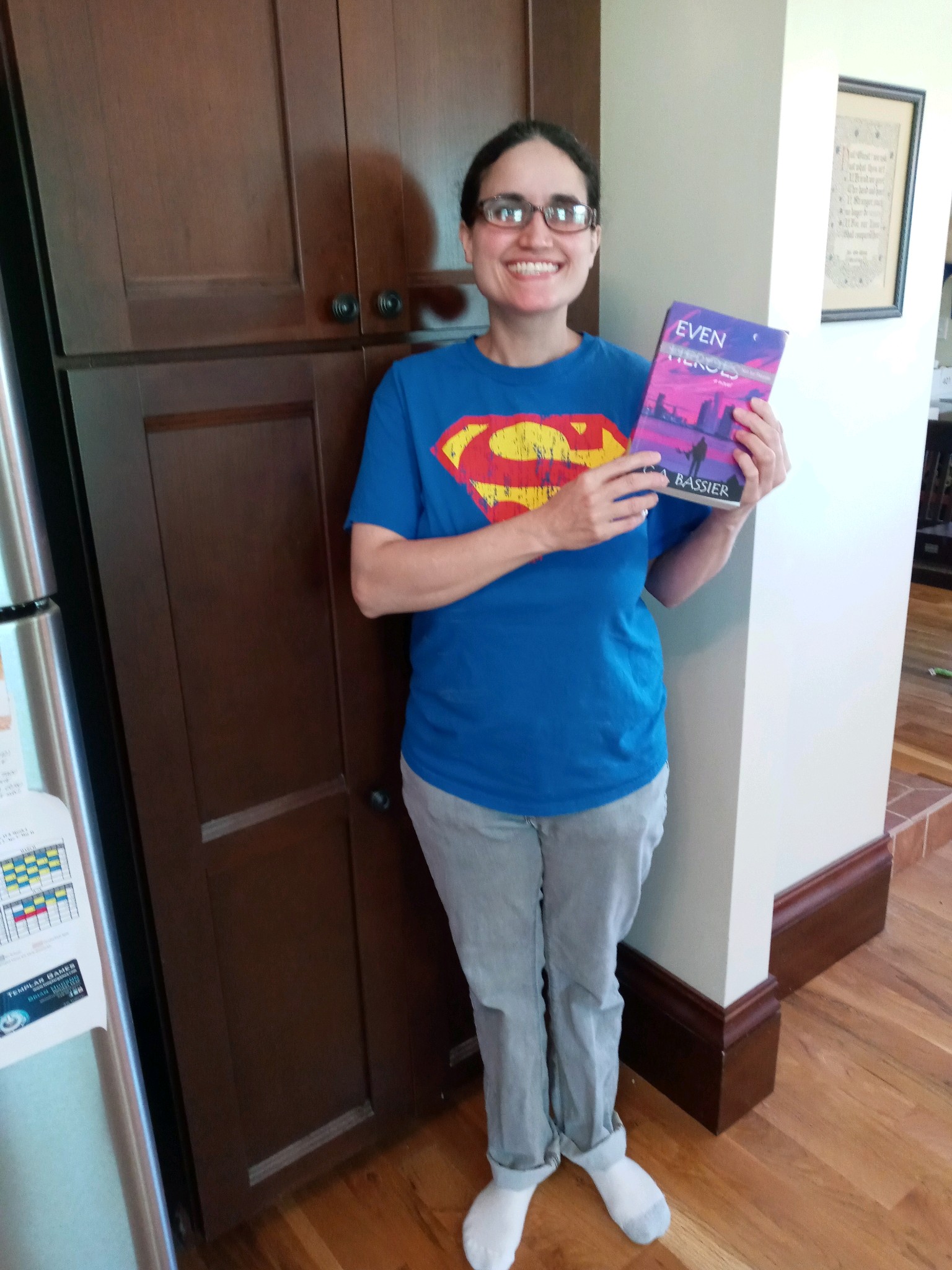
Me, after receiving my first proof copy. For days afterward, I could not stop picking it up and looking at it. 🙂
My first proof arrived really fast, and as you can see from the rather idiotic grin on my face, I was satisfied with how the book came out. Also, as an added bonus, the cost of printing plus shipping and taxes for my proof copy is exactly $11.21. Which, for my fellow X-Philes out there, just felt like a little bit of icing on the destiny cake. 🙂
Coincidence, fate, or a global conspiracy? You decide. 🙂
I hope hope HOPE that I’ll be pushing that scary “Publish” button very soon. In the meantime, thank you for joining me on this crazy but wonderful journey to realize a dream that has been over 15 years in the making.
So, after getting my print book all squared away, I thought I was close to publishing my novel. I just needed to format my eBook, which, thanks to Kindle Direct Publishing’s proprietary software (called Kindle Create), was supposed to be a breeze even for a newbie like me. You just load your Word document into the program, polish up your book so everything looks pretty, and you’ll be good to go. Easy-peasy…right?
To be fair, I think Kindle Create IS reasonably easy to use, and for most people it would be a perfectly good tool to create a lovely Kindle eBook. For me, the problem came when my book showed a glitch in one device mode in KDP’s online previewer. All the other previews looked great, but this weird glitch really had me concerned, so I reached out for help on the wonderful KDP Community forums. Many people responded right away with thoughts and suggestions for getting to the root of the issue.
I tried everything they suggested as well as some of my own ideas. In the course of trying to solve this mysterious glitch, I removed all fixed fonts from my book, uploaded a Word document directly, reformatted my Word doc and tried again (I later learned I did a really horrible job of reformatting it), and eventually, as a last resort, actually learned a little bit about coding (I knew nothing prior to this experience), saved my book as a plain text file, and coded it myself from scratch using HTML and CSS.
Dark Days
When even THAT failed to fix my issue, I contacted KDP technical support for assistance. They were very nice and worked hard to figure out what I was seeing in that one wonky preview, but ultimately came up with bupkis, and left me feeling like they might not even believe that I had seen anything abnormal in the first place (despite numerous screen caps showing the issue). I’m not going to lie to you, people – things were looking pretty dark at that point. My life had been on hold for months, and I just had no idea how to move forward.
A Helping Hand
Desperate and out of options, I turned to the KDP Community again, and an amazingly kind, professional eBook formatter named Hitch came to my rescue and offered to look at my files and try to see what was going on. She did an absolutely incredible job combing through my eBook, searching for any dastardly formatting that might be responsible for the glitch.
To date, despite everyone’s best efforts, there is still no known cause for what I am seeing in that one preview. There was a lot of crazy stuff in my Word file (like, a LOT), but nothing that should cause the specific glitch I am experiencing, and nothing in the EPUB file, either. As frustrating as it is, we may never know the answer. BUT, after talking to an experienced pro who has formatted thousands of eBooks, I feel like there is a very good chance the eBook will render correctly out in the real world. In other words, I’m hoping, based on all of the available evidence (including the MOBI version showing up nicely on my Fire), that the glitch is limited to that one preview, and I am ready to move forward with publication. Phew!
The point of this post, however, is not to whine about my eBook woes, but rather to focus on the positives of what I learned as the result of my experience. I learned the basics of coding, which was really fun and massively useful (I’ll have a separate post about this somewhere down the line). I learned how important it is for me to get familiar with Styles/Headings/etc in Word, because not knowing these things can make an anthill-sized task into a Mt. Everest-sized one. And I learned that the indie publishing community is filled with wonderful people who care about newbies and want to help us swim rather than sink in the scary ocean that is Kindle Direct Publishing.
Formatting is not my strongsuit. At all. To quote one of my college professors: “I’m not going to mark you down on those last few pages, because obviously something happened and you didn’t intend for it to look like that.” So yeah, formatting and me? Hardly on the best of terms.
When I decided to go the indie route, I had to choose which aspects of the publication process I could handle on my own, and which I would have to shell out $$$ for. And, even though formatting has been the ugly, drooling, Dorito-breath monster in my closet for years, I decided to face the beast head on and at least TRY to format my own book before breaking down and hiring a professional.
Why, you ask? Two reasons:
1.) I am so painfully broke it’s not even funny.
2.) I felt that formatting was something I could actually learn to do well if I put in the time and effort. And, if successful, I would then be able to do it for all of my future books, thereby saving my (hopefully slightly less broke) future self some cash down the line.
As a format-challenged person, learning this skill was sort of like having a root canal minus the novacaine – something I have actually experienced, and yes it hurt like you-know-what. But after countless hair-pulling moments and a few pillow screams, I finally had a book that looked exactly the way I wanted it to. No weird spacing issues. No random alignment gaffes. Blank pages only where I intended them to be (and nowhere else!).
For some people, this might sound easy-peasy. For me, however, this was a Mt. Everest-level accomplishment. And since I know I can’t be alone when it comes to my formatting struggles, I decided to share some of the tips and resources that helped me, along with a few of the issues I considered while formatting my book for print.
Decisions, Decisions
If you decide to format your own manuscript, you’ll be in charge of choosing everything from the actual trim size of the book all the way down to the font size and type, line spacing, and how the first page of each chapter will look.
Some details that might affect these decisions:
-Book Length
-Genre
-Intended Audience
In my case, I have a novel for younger audiences (11-13 years), so an easy-to-read font was paramount. My book is also somewhat long, so I had to take the potential spine width into account as I looked at different trim sizes. The bigger your book’s trim size is, the larger the pages are and the more words you can fit on them. Which means a skinnier spine and a lower printing cost. However, books with extremely large trim sizes can be awkward and uncomfortable for readers to hold. So everything is about finding that right look and right balance for your specific novel. To gain one element, you might have to sacrifice another.
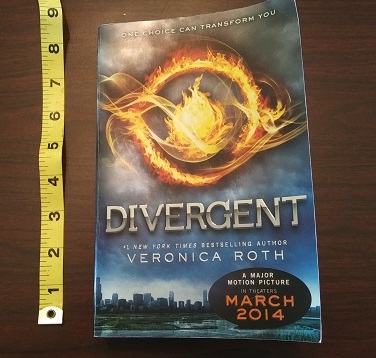
In my opinion, an ideal paperback has a trim size of 5″ x 8″. Because of my book’s length, I had to compromise on this a bit and go with 5.25″ x 8″. If you have a super short book, you might want to go the opposite way and choose the smallest trim size to make your book thicker.
Many professional novels have each chapter start on an odd numbered page, even if it would not naturally fall there. Because my book is long with fairly short chapters, this would have meant including a significant number of unnecessary blank pages. Since I do actually care about trees, I decided not to restrict myself in this way. I also elected to do without the standard header (alternating between author’s name and book title) on each page. Again, this was to save pages and keep the text easy to read.
My novel has the same trim size as the paperback edition of Divergent
One thing that’s really beneficial (and also kinda fun) is to take a bunch of books off your shelf and actually measure them. You’ll be amazed at the range of sizes. Flip through each one and sample how their chapter openers look, where the page numbers are, how they display the header and footer, what fonts are used. There are so many different styles! Make a note of which books in your genre have the best “look” and try to emulate that.
If you’re writing a science fiction novel, you might want to use a futuristic font for the chapter headings to give it that sci-fi feel. For a memoir, chapter titles might look cool in a font that looks like handwriting (as long as it’s legible!). If you’re writing a heart-pounding action adventure set on a global stage, you may want each chapter opening to have additional information like what country the characters are in, what time it is, and how many minutes are left until the bomb goes off!
Below are some links and tips to help make your book both beautiful and professional.
Resources
This is THE best video ever for formatting your print book in MS Word. This totally saved my life. The author explains everything and makes it all so easy a kindergartner (or me!) could do it. The vid covers common mistakes (and how to avoid them), mirror margins, gutter space, formatting chapter headings using styles, line spacing and more. The only things it doesn’t really touch on are drop caps (those pretty, extra big letters at the start of each chapter) and page/section breaks. But this will give you all the basics and you’ll be in great shape as you move on to some of the more intricate details.
Here is a link to KDP’s guide to trim sizes. It also discusses bleed (when you want an image to go off the edge of the page) as well as their recommended margins for different sizes of books. (Tip: go bigger than recommended for the gutter margin).
KDP’s instructions for formatting your print book. IMHO, the video posted above is much easier to follow, but there are a few elements here not included on that vid, e.g. the section break stuff, which is really important if you want certain pages NOT to have numbers on them. Page breaks are also important to learn about, especially when it comes time to format your ebook, so definitely don’t skip out on these lessons. The most valuable thing I got out of this page was the last part, which clearly explains how to export your final Word Doc(x) as a pdf, the form it must be in to upload it to your bookshelf.
How to create drop caps in MS Word. (FYI, drop caps RULE! They make your book look awesome and professional. Tip: To change the appearance of your drop cap, e.g. how tall it is, click “Drop Cap Options.”)
Have Fun Building Your Book!
Reading about all of these new terms can be overwhelming for a first-timer. It definitely was for me! Just remember that it does get easier. Any problem you have or anything you can’t figure out how to do, just call on your old pals Google, Bing, and YouTube and they will help you find someone who can answer your question. If you want to do something special, like add a map to the beginning of your book, or an image next to each chapter title, or a blank page with just a quote right in the middle, don’t give up simply because it seems too hard. Keep trying until everything looks exactly the way you envisioned. You deserve it, and so does your book. 🙂
I may not have gotten much writing done during the pandemic. Or much reading. Or much exercising. But I do have ONE claim to productivity over the last year and a half: I’ve been slowly, quietly getting my first novel ready for publication.
The idea of publishing independently has been knocking around in my brain since I attended a workshop on the subject roughly ten years ago. Since then, I’ve participated in several more workshops, read numerous indie-published books, and even interviewed an indie author. The more I learned, the more I liked what I heard:
Complete control over your content. Publishing at your own pace. Earning higher royalties. The freedom that comes with being your own boss. And, probably most important for me: the opportunity to share unique stories that traditional publishing doesn’t want to take a chance on.
One thing that has struck me about most of the indie books I’ve read: They’re special. They’re different. They’re not cardboard cutouts of every other book in their genre. Some of these books experiment with style, structure, or just explore a topic so different from anything I’ve read before that I doubt the authors could come up with a comp title even if someone offered them $50K. As a reader, I find this stimulating, exciting. I like different.
I am different.
Of course, traditional publishing had always been the dream, and letting go wasn’t easy. There will be no advance on royalties, no prestige of having my work get “chosen” by an agent, no NYT Bestseller List bragging rights.
But maybe, just maybe, with a TON of hard work, I’ll earn a small readership who appreciates quality writing that doesn’t quite fit the mold. And maybe, just maybe, one day I’ll get to have an even greater honor than being chosen by any agent or editor:
The honor of being chosen by YOU, the reader.
Best wishes to all, keep writing, and stay tuned for more posts about my publishing journey!










 as the HERO flies...